
Best Kids Smart Watches Australia 2026: Garmin vs Alternatives (GPS That Actually Works)
If you’re anything like me, the first time you handed your child a watch that promised to track their every step, you probably felt a strange mix of relief and low-grade anxiety. On the one hand, being able to see where your kid is when they’re walking home from school is genuinely reassuring. On the other, the market is absolutely flooded with cheap knock-offs that promise the world and deliver a laggy map, a dead battery by lunchtime, and GPS that puts your seven-year-old somewhere in the middle of the ocean.
So let’s cut through the noise together. I’ve spent a ridiculous amount of time researching and comparing what actually works here in Australia, because a watch that’s brilliant in the US isn’t much use if it can’t hold a signal in the school pick-up chaos or survive a Saturday at Nippers. Whether you’re after a proper gps tracker for kids so you can breathe a little easier, or a fun fitness watch to get your kid moving, this guide is here to help.
Below I’ve rounded up the best options for 2026, including where the garmin kids watch range shines, where it doesn’t, and which alternatives are genuinely worth your money. No fluff, no judgement, just honest advice from someone who’s been down the rabbit hole so you don’t have to.
What to look for in a kids smart watch in 2026
Before we get into specific models, it helps to know what actually matters. The marketing on these devices is relentless, so here’s what I’d genuinely prioritise as an Australian parent:
- Real GPS, not “approximate location”: Some cheaper watches use wi-fi and mobile tower triangulation only, which can be wildly inaccurate. If safety tracking is your main goal, you want true GPS with a SIM card (usually a small monthly plan).
- Battery life: A watch that dies at 2pm is useless for an after-school pickup. Look for realistic all-day battery, and be sceptical of inflated claims.
- Water resistance: Australian kids live in and around water. A minimum of splash-proofing is essential; proper swim-ready rating is even better.
- Durability: Playgrounds, footy, monkey bars. The watch will cop a beating.
- Communication vs tracking: Decide whether you want two-way calling and messaging (great for older kids) or purely activity tracking (better for littlies).
- Parental controls: School mode, contact limits, and the ability to lock down who can reach your child.
- Ongoing costs: GPS communication watches usually need a SIM plan. Factor this into your budget beyond the sticker price.
One important distinction: Garmin’s kids range is primarily about fitness and fun, while dedicated GPS phone-watches are about safety and staying in touch. They’re solving slightly different problems, so the “best” choice depends entirely on what you actually need.
The Garmin kids watch range: what you’re really getting
Let’s clear up a common misconception first, because it trips up a lot of parents. When people search for a garmin kids watch, they’re usually picturing a GPS safety tracker where they can see their child’s live location on a map. That’s not quite what Garmin’s kids range does.
Garmin’s children’s watches, the Garmin Bounce and the Garmin vivofit jr. 3, are built around movement, chores, rewards and (in the case of the Bounce) parent-to-child messaging. They’re wonderful at getting kids active and teaching responsibility, but they are not primarily designed as live safety trackers in the way a dedicated GPS phone-watch is.
Garmin Bounce
The Bounce is Garmin’s flagship kids watch and the closest thing they offer to a connected device. Approx. RRP is around $200–$250. It uses an LTE connection (requiring a small monthly subscription) so you can send messages to your child and request their location through the Garmin Jr. app.
Pros:
- Two-way text messaging between parent and child
- Location check-ins via the app
- Genuinely fun activity tracking, games and chore/reward system
- Strong, trusted brand with solid app support
- Good water resistance for swimming
Cons:
- Location is on-request rather than constant live tracking, not ideal if you want minute-by-minute monitoring
- Requires an ongoing LTE subscription
- No voice calling, which older kids often want
- Battery is a couple of days rather than a week
Garmin Bounce
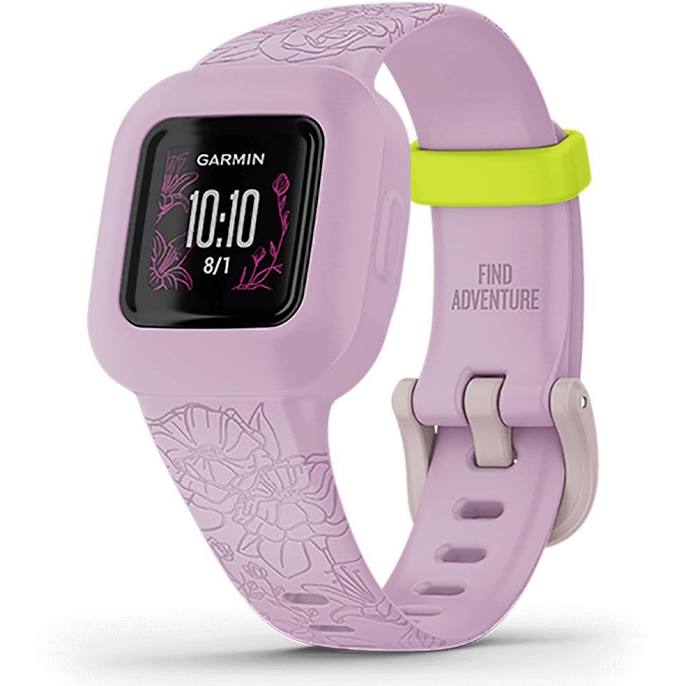
Garmin vivofit jr. 3
The vivofit jr. 3 is the budget-friendly, no-subscription option, with an approx. RRP around $130–$160. It has a colour screen, kid-friendly adventure themes (think Disney, Marvel and Star Wars bands), step tracking, chore management and a huge battery life because there’s no power-hungry GPS or LTE.
Pros:
- Up to a year of battery life on a replaceable coin cell, no nightly charging
- No subscription fees at all
- Swim-friendly and very durable
- Brilliant for younger kids (around 4–9) and building healthy habits
Cons:
- No GPS or location tracking whatsoever
- No messaging or calling
- Small screen, more “activity band” than smartwatch
Garmin vivofit jr. 3
My honest take: If your goal is a fun, motivating fitness watch and you don’t need location tracking, the vivofit jr. 3 is genuinely excellent value. If you want messaging plus occasional location check-ins, the Bounce is lovely. But if your number one priority is a proper gps tracker for kids with reliable live location, you’ll want to look at the dedicated alternatives below.
The best GPS tracker watches for kids (safety-first alternatives)
If live location tracking and being able to actually call your child is the whole point, these are the watches built specifically for that job. This category has come a long way, and the GPS accuracy in 2026 is genuinely impressive compared to a few years ago.
Spacetalk Adventurer 3
Spacetalk is an Australian company, and honestly, that matters here, the network compatibility, local support and app are all tuned for our conditions. The Adventurer 3 has an approx. RRP around $350–$400 and is one of the most complete safety watches on the market.
Pros:
- Reliable live GPS tracking that actually works around Australian suburbs
- Two-way voice calling and video calling to approved contacts
- SOS emergency button
- School mode to minimise distraction during class
- No social media, no open internet, a genuinely walled garden
- Geofencing alerts when your child leaves a set zone
Cons:
- Higher upfront cost plus an ongoing SIM plan
- Battery is roughly a day with heavy use, so charging becomes a routine
- Bulkier on very small wrists
Spacetalk Adventurer 3
Spacetalk Loop
If the Adventurer feels like a lot, the Loop is the slimmer, more affordable Spacetalk with an approx. RRP around $200–$250. It keeps the core safety features while looking more like a regular watch.
Pros:
- GPS location and geofencing
- Voice calling and messaging to approved contacts
- SOS function
- Lighter and lower profile, great for smaller kids
Cons:
- No camera, so no video calls
- Still needs a SIM plan
- Fewer fitness bells and whistles
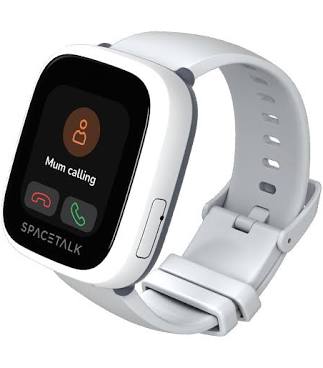
Spacetalk Loop
TicWatch Kids / Xplora XGO series
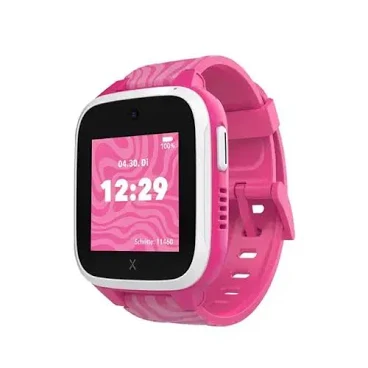
The Xplora XGO3 is a well-regarded international option with an approx. RRP around $200–$280. It offers GPS, calling, messaging, a step-based rewards system (kids earn points for walking, which is a lovely touch), and solid water resistance.
Pros:
- GPS tracking plus calling and messaging
- Steps-to-rewards system that motivates activity
- SOS button and geofencing
- Competitive pricing
Cons:
- Network compatibility needs checking against your SIM provider
- App experience is good but not quite as polished as Spacetalk’s local offering
- Battery is around a day of active use
Quick comparison: the top picks side by side
| Product | Brand | Key features | Best for |
|---|---|---|---|
| Bounce | Garmin | Messaging, location check-ins, activity & chores, LTE | Fitness fans who want light communication |
| vivofit jr. 3 | Garmin | Year-long battery, no subscription, chores, adventure themes | Younger kids & habit-building on a budget |
| Adventurer 3 | Spacetalk | Live GPS, voice & video calls, SOS, geofencing | Full safety features for older kids |
| Loop | Spacetalk | Live GPS, calling, SOS, slim design | Safety essentials for smaller wrists |
| XGO3 | Xplora | GPS, calling, steps-to-rewards, SOS | Value-conscious families wanting GPS + motivation |
We’ve reviewed 21 health & safety in total — compare the full list before you decide.
Does the GPS actually work? The honest truth for Aussie families
This is the big question, and it deserves a straight answer. The short version: yes, GPS on the better watches works well in 2026, but with caveats you should know about.
True GPS (the kind that talks to satellites) is genuinely accurate in open areas, parks, ovals, walking routes, the beach. Where it struggles is the same place your phone struggles: inside big shopping centres, underground car parks, dense high-rise areas, or thick bushland with heavy canopy. In those spots the watch falls back on wi-fi and mobile tower positioning, which can be off by a hundred metres or more.
What separates a good watch from a frustrating one is how it handles that. The Spacetalk range, being locally developed, tends to reacquire signal faster and gives you a realistic accuracy radius rather than pretending it knows exactly where your child is. The cheapest no-name watches (often under $80) are the ones that infamously drop pins in the ocean, I’d steer well clear of anything that won’t tell you which positioning technology it actually uses.
My advice: for genuine safety tracking, buy a watch with real GPS and a SIM, test it thoroughly in your own neighbourhood in the first two weeks, and set your expectations to “reliable general location” rather than “pinpoint to the exact doorway.”
Safety, privacy and Australian standards
A connected device on your child’s wrist raises questions worth taking seriously. In Australia, electrical and wireless products should comply with the relevant ACMA and ACCC safety requirements, reputable brands like Garmin, Spacetalk and Xplora meet these, which is another reason I’d avoid grey-market imports that skip local compliance.
A few practical safety pointers:
- Lock down contacts: Every watch here lets you approve exactly who can call or message your child. Set this up before handing it over.
- Understand where the data lives: Choose brands with clear privacy policies. Spacetalk being Australian-based means data handling aligns with local expectations, which gives many parents peace of mind.
- Skin and wear: Watch for any skin irritation under the band, especially in a hot, sweaty Aussie summer, and clean the band regularly.
- School rules: Many schools have policies on wearable devices. Check first, school mode helps, but some schools require watches be handed in.
- Charging safety: Use the supplied charger and never leave devices charging unattended on flammable surfaces.
The goal here isn’t surveillance, it’s a safety net. I always encourage families to talk openly with their kids about why they’re wearing the watch, so it feels like teamwork rather than being watched.
Matching the watch to your child’s age and stage
The right pick shifts a lot depending on your child. Here’s how I’d think about it:
Ages 4–7: At this stage, you’re usually the one holding the phone anyway, and littlies aren’t roaming solo. A fun activity watch like the Garmin vivofit jr. 3 is ideal, it builds movement habits, teaches chores, and there’s no charging drama or subscription. If you want the ability to reach them at, say, before-school care, the Spacetalk Loop is a gentle step up.
Ages 8–11: This is the sweet spot for a proper GPS communication watch, as kids start walking to a friend’s house, riding to the park, or catching the bus. The Spacetalk Loop or Xplora XGO3 hit the balance of safety and simplicity, while the Garmin Bounce suits families who want messaging plus a big focus on activity.
Ages 12+: Older kids often want more independence and features, and this is where the Spacetalk Adventurer 3 with video calling shines, though many families at this age start weighing up whether a basic phone makes more sense. There’s no wrong answer; it depends on your child’s maturity and your household rules.
mum.com.au Approved: our top recommendations
After all the research, here’s where we’ve landed for 2026:
Best overall GPS safety watch: Spacetalk Adventurer 3. If your priority is genuinely knowing where your child is and being able to reach them, this is the most complete, reliable option for Australian conditions. The local support and network tuning make a real difference, and the SOS plus geofencing features give proper peace of mind. Yes, it’s an investment plus a SIM plan, but for safety, it earns its keep.
Best value safety pick: Spacetalk Loop. Most of the core safety features in a slimmer, friendlier package at a gentler price. For families dipping their toe into GPS tracking, this is the one I’d point most parents toward first.
Best for fitness and fun (no subscription): Garmin vivofit jr. 3. If you don’t need tracking, this is a joy, a year of battery, no ongoing fees, and kids genuinely love the adventure themes. Brilliant for younger children and building healthy habits.
Best hybrid Garmin option: Garmin Bounce. For families who want top-tier activity tracking with the reassurance of messaging and location check-ins, the Bounce is a lovely middle ground, just go in knowing it’s not constant live tracking.
Our top pick across the board for most Australian families.
The value choice when you want the essentials without overspending.
The splurge pick if you want the most features and finish.
Frequently asked questions
Does a Garmin kids watch have live GPS tracking like a phone?
Not quite. The Garmin Bounce offers location check-ins on request through the app (over LTE), rather than continuous live tracking, and the vivofit jr. 3 has no location tracking at all. If constant live location is your main goal, a dedicated GPS watch like the Spacetalk Adventurer 3 or Loop is a better fit.
Do kids GPS watches need a SIM card and monthly plan?
The GPS communication watches (Spacetalk Adventurer 3 and Loop, Xplora XGO3, and the Garmin Bounce) require a SIM and a small ongoing plan to enable calling, messaging and location features. The Garmin vivofit jr. 3 is the exception, it has no SIM, no subscription and no GPS. Always budget for the plan on top of the watch price.
Are these watches waterproof enough for swimming?
Both Garmin kids watches are swim-friendly, and the Spacetalk range is water-resistant for splashing and rain. Always check the specific water rating for the model you choose, and rinse the watch in fresh water after ocean or pool use to protect it, a good habit through an Australian summer.
What age is best to give a child a smart watch?
There’s no single right answer. Activity watches like the vivofit jr. 3 suit kids from around 4, while GPS communication watches tend to make most sense from around 8, when children start having more independence. It really comes down to your child’s maturity and your family’s routine rather than a strict age.
Will the GPS work reliably in my area?
In open areas GPS is very accurate; it’s less reliable inside large buildings, underground or in dense bushland. Network coverage also matters, which is why we recommend testing thoroughly in your own neighbourhood within the return window. Locally developed watches like Spacetalk tend to handle Australian conditions particularly well.
The bottom line
Here’s my honest summary, friend to friend. If safety and knowing where your child is sits at the top of your list, the Spacetalk Adventurer 3 is the standout for Australian families in 2026, with the Spacetalk Loop as the smart, more affordable entry point. If you’re after a fun, motivating fitness watch with zero ongoing costs, you genuinely can’t go wrong with the Garmin vivofit jr. 3, and the Garmin Bounce is the loveliest bridge between activity tracking and light communication.
The most important thing is to be clear about what problem you’re solving. A garmin kids watch is fantastic for fitness and fun; a dedicated gps tracker for kids is what you want for true safety and staying in touch. Match the watch to your child’s age, your budget, and your genuine needs, not the loudest marketing, and you’ll land on the right choice.
Whichever way you go, take a moment to set up the parental controls properly, have a warm chat with your child about how it works, and test the GPS in your own patch before the return window closes. That little bit of upfront effort makes all the difference.
Where to buy these picks
✓ Verified prices are checked live at the retailer. Otherwise we show the approximate RRP (an indicative recommended price, not a live retailer price), or “price pending” where we don’t have one.
Spacetalk Adventurer 3
★ Best for older kids
Garmin vivofit jr. 3
Best for younger kids
Garmin Bounce
Best for active kids
Spacetalk Loop
Best for small wrists
Xplora XGO3
Best value GPS watch
The shortlist, in your inbox
New winners, price drops and recalls worth knowing.