
Kids Garmin Watch vs Apple Watch 2026: The Best Kids Smartwatches in Australia
Most mums don’t go looking for a kids smartwatch because they want another screen in the house. It usually starts with a logistics problem: the walk home from school on her own for the first time, Saturday sport where you’re on one side of three ovals and she’s on the other, or the after-school gap where she’s at a friend’s place and you’d quite like her to be able to ring you without you handing a nine-year-old a phone.
The trouble is that “smartwatch for kids” is one of the messiest categories in Australian retail right now. You’ve got Garmin’s kid-specific watches, Apple’s Family Setup route, a handful of Australian 4G watch-phones like Spacetalk, and then a swamp of unbranded watches with impressive-sounding feature lists and no real support behind them. The prices overlap, the subscriptions are buried in the fine print, and half the reviews online are written for the American market where the plans and networks work differently.
So here’s the shortlist instead of the 40 open tabs. Six real watches you can search by name today, what each one actually does, what it costs to run once the box is open, and which ones are honestly not worth your money. No hands-on claims here: this is research, specs, standards and what owners consistently report, which is exactly what you need before you spend a few hundred dollars on something that lives on a seven-year-old’s wrist.
First, work out which problem you’re solving
This is the step that saves the most money, and almost nobody does it. There are three genuinely different products all sold under the same search term, and buying the wrong category is how families end up with a watch nobody wears by Easter.
A tracker (no SIM, no calls)
Step counts, sleep, activity goals, chores and rewards in a parent app. No location tracking, no calls, no messages, no subscription. This suits younger primary kids (roughly four to eight) where the real goal is “something fun on her wrist that doesn’t open the internet”. Garmin’s vivofit jr. line lives here.
A watch-phone (4G, calls, live location)
Its own mobile connection, a parent-approved contact list, two-way calls and messages, live location and safe-zone alerts. This is the one that answers the walking-home-alone moment, and the one that carries an ongoing monthly cost. Garmin Bounce 2, Spacetalk and Moochies sit here.
A grown-up smartwatch, managed by you
An Apple Watch set up through Family Setup, so your child wears a real Apple Watch that you control from your iPhone. The most capable option by a mile and the most expensive to buy and run. Generally best for kids nine and up, and only if you’re an iPhone household.
What to look for in a kids smartwatch
The spec sheets are deliberately dazzling. These are the things that actually decide whether the watch is still in use in twelve months.
- 4G, not 2G or 3G: Australia’s 3G networks were switched off during 2024, which turned a lot of cheap “GPS kids watches” into bricks. If a listing doesn’t clearly say 4G LTE, walk away.
- Closed contact list: the watch should only be able to call and be called by contacts you approve in a parent app. Unknown numbers should never reach your child’s wrist.
- No browser, no app store, no social: the single biggest reason parents choose a watch over a phone. Confirm it, don’t assume it.
- School mode: a scheduled lockdown that disables everything but the time during class hours. Every Australian state now restricts phones in public schools, and many schools apply the same policy to watches that can call or message.
- Real battery life: a 4G watch that needs charging every night will be flat in her school bag by Wednesday. Ask what the figure is with location updates and calls switched on, not in standby.
- Water rating you can trust: IP67 means splashes and rain. Swimming lessons and Nippers need a watch rated for swimming (5 ATM or 50 metres). These are not the same thing.
- Band size and weight: small wrists and chunky watches are a bad match. Check the smallest band circumference rather than guessing from a photo.
- The running cost, in writing: subscription, SIM plan or both. This is the number that decides whether the cheap watch is actually cheap.
- Compliance markings: any device with a radio in it sold here should carry the RCM mark and meet ACMA requirements. There is no kids-smartwatch-specific Australian Standard, so this and the brand’s local support are your real safeguards.
- Coin-cell safety if it has a replaceable battery: Australia’s mandatory button battery safety and information standards (in force since 2022) exist because these batteries are dangerous if swallowed. The compartment should need a tool to open.
The best kids smartwatches in Australia for 2026
1. Garmin Bounce 2
If you want one watch that does the safety job without handing over a phone, the Bounce 2 is the most complete answer for primary-school kids. It’s a 4G LTE watch with its own connection, so it works independently of your phone: your child can call and message a contact list you approve from the Garmin Jr. app, you can see location and set safe zones with arrival and departure alerts, and none of it involves a browser, an app store or a stranger being able to ring her.
What lifts it above the other watch-phones is the Garmin side of the family tree. Activity tracking is genuinely good rather than decorative, there’s a chore and reward system you can actually use (points for making the bed, redeemable for whatever currency operates in your house), and games are gated behind activity goals rather than sitting there as a default time sink. Expect an approx. RRP of around $270 to $340, and a Garmin LTE subscription on top of roughly $10 to $20 per month, which is the part to budget for properly.
The trade-offs are real. It needs charging every day or two with LTE and location active, which is a habit the whole family has to build. It’s also unapologetically a kids’ device in looks, so a Year 6 student who has decided she’s nearly a teenager may push back. And Garmin’s kid-watch ecosystem is a walled garden: brilliant for peace of mind, less flexible if you want a specific messaging app or a particular carrier arrangement.
- Its own 4G connection: no paired phone needed for calls, messages or location
- Parent-approved contacts only, with no browser, app store or social apps
- Best-in-class activity tracking, chores and rewards, plus school mode for class hours
- Rated for swimming, so it survives swimming lessons and the beach (confirm the current ATM rating on the spec sheet)
- Trade-off: monthly subscription required, and daily-to-second-daily charging
Garmin Bounce 2
2. Garmin vivofit jr. 3
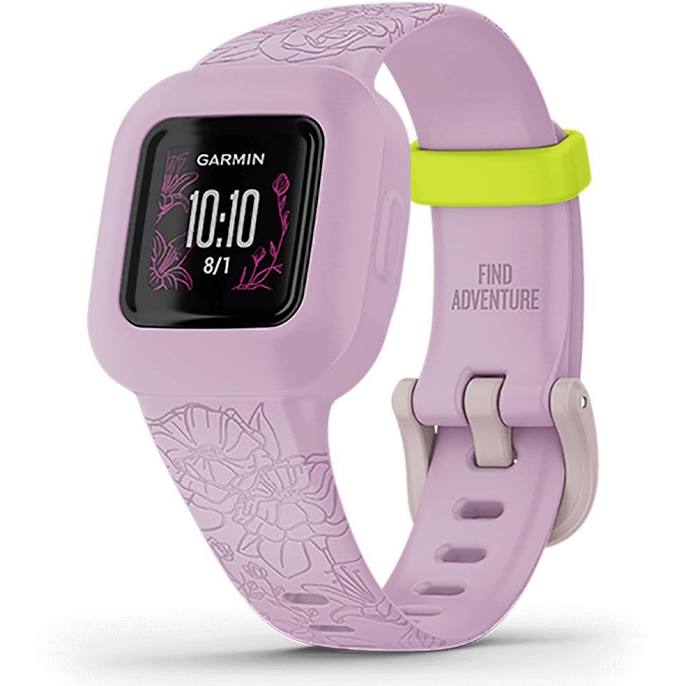
This is the pick for parents whose honest answer to “do you need her to be able to ring you?” is no, not yet. There’s no SIM, no calling, no location tracking and no subscription: it’s an activity and habit tracker with a colour screen, steps and active-minutes goals, sleep tracking, a chore and reward system in the parent app, and unlockable adventure stories built around Disney, Marvel and Star Wars characters depending on which band you choose.
The headline spec that makes it so easy to live with is the battery. It runs on a replaceable coin cell that lasts up to around a year, so there is no charger, no nightly ritual and nothing flat on the morning of school photos. It’s also rated for swimming and light enough for a four-year-old’s wrist. At an approx. RRP of around $120 to $170 with no ongoing cost, it’s the least regrettable purchase in this guide.
Be clear-eyed about what it isn’t: it is not a safety device. It will not tell you where your child is and she cannot use it to call you. If your reason for buying is independence and contact, this is the wrong tier and you’ll be shopping again in six months. Because the battery is a coin cell, check that the compartment is screwed shut before it goes on a wrist, especially with younger siblings in the house.
- Roughly a year on a replaceable coin cell: no charging routine at all
- No SIM, no subscription, no calls, so no ongoing cost and nothing to lock down
- Chores, step goals and character adventures that younger kids genuinely engage with
- Swim-rated and light enough for four-to-eight-year-old wrists
- Trade-off: no location, no calling, so it does not solve the walking-home-alone problem
Garmin vivofit jr. 3
3. Apple Watch SE (3rd generation)
For an older child, roughly nine and up, in an iPhone household, Apple’s Family Setup is the most capable option going. You set the watch up from your iPhone without the child having an iPhone of their own: you approve contacts, you see their location in Find My, they get Messages and calls, and Schooltime locks the watch down to a plain clock face during school hours. Fall detection and Emergency SOS are the sort of features you never think about until a kid comes off a scooter.
You need the cellular version for any of the independence to work away from home, plus a watch plan from a carrier that supports it in Australia, which is a smaller list than you’d expect and worth confirming before you commit. The approximate RRP sits around $400 to $560 depending on case size and whether you take cellular, and then there’s the monthly plan. The current SE generation brings a faster chip, an always-on display and quicker charging, which matters more than it sounds when you’re topping up a watch before school.
Honest trade-offs: it’s a grown-up device, so it charges daily, the smaller 40mm case is still chunky on a slim nine-year-old wrist, and it has far more capability than most primary kids need (which means more parental configuration, not less). It’s also Apple-only. If you’re an Android family, Family Setup simply isn’t an option and you should be looking at the Bounce 2 or a Spacetalk instead. The upside is longevity: it’s the only watch here a 13-year-old will still happily wear.
- Family Setup means no iPhone required for the child, with parent-approved contacts and Schooltime
- Location in Find My, Emergency SOS and fall detection on a mature, well-supported platform
- Grows with the child: the only pick here that still suits early high school
- Trade-off: iPhone households only, cellular model plus a supporting carrier plan needed
- Trade-off: daily charging, and the largest ongoing cost in this guide
Apple Watch SE (3rd generation)
4. Spacetalk Adventurer 2
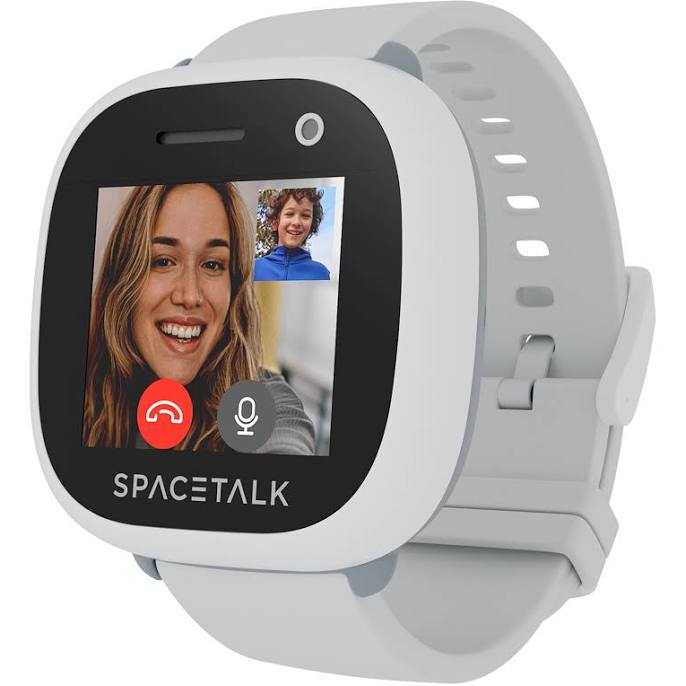
Spacetalk is an Australian company that has been building kids’ watch-phones here longer than most, and that local grounding shows up in the details: school mode built around Australian school hours, SOS that alerts your nominated contacts, safe zones and location history, and a deliberately closed system with no internet browsing and no social apps. It also has a camera, which kids love and some schools specifically don’t, so check the policy before you buy.
The Adventurer 2 sits at an approx. RRP of around $300 to $390 and needs its own mobile plan (Spacetalk sells plans designed for its watches, or you can use a suitable SIM). Owners consistently rate the parent app for being straightforward, and the SOS function is the feature families most often name as the reason they chose it. Australian-based support is a genuine advantage when something goes wrong in week three.
It’s chunkier than the Garmin and the screen is a step behind, so it suits kids roughly five to eleven rather than anyone hovering near high school. Battery is the usual 4G story: a day or two with real use, less if she’s calling Nana twice a day. Splash and rain resistance is the expectation here rather than swimming, so treat it as a take-it-off-before-the-pool watch unless the current spec says otherwise.
- Australian brand with local support and a school mode tuned to school hours here
- SOS, safe zones and location history, with a closed contact list and no browser
- Camera and messaging that kids actually enjoy using, which keeps it on the wrist
- Trade-off: bulky on small wrists, and the display is behind the Garmin and Apple options
- Trade-off: needs its own plan, and it’s a splash-resistant design rather than a swimming one
Spacetalk Adventurer 2
5. Spacetalk Loop
The Loop is the pared-back version of the same idea, and for a lot of families it’s the smarter buy. It keeps the essentials (4G calls and messages to approved contacts, location, SOS, school mode) and trims the extras, which brings both the purchase price and the fiddliness down. Approximate RRP lands around $180 to $250, plus a plan.
Think of it as the “I just want her to be able to ring me” watch. Fewer features means fewer negotiations about games and photos, a slimmer case that sits better on a younger child, and less to go wrong. If your six-year-old is doing pick-up with an older sibling and you want a direct line, this does the job for meaningfully less than the Adventurer 2 or the Bounce 2.
What you give up is depth. Fitness tracking is basic next to a Garmin, the feature set won’t hold the interest of an older child, and you’re still paying a monthly plan, so the total cost of ownership isn’t as different from the Adventurer 2 as the sticker suggests. Check the current water rating before it goes anywhere near a pool.
- Cheapest way into a proper 4G watch-phone with SOS and approved contacts
- Slimmer and simpler, which suits younger primary kids and fewer household negotiations
- Australian brand and parent app, same closed-system approach as the Adventurer 2
- Trade-off: basic activity tracking and limited appeal past about age nine
- Trade-off: still needs a monthly plan, so the running cost is similar to pricier watches
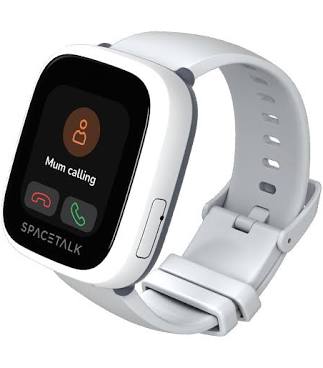
Spacetalk Loop
6. Moochies Odyssey
Moochies is the other name that comes up constantly in Australian kids-watch conversations, and the Odyssey is its 4G watch-phone: calls and video calls to approved contacts, GPS location, geofencing, SOS and a parent app, with an approx. RRP of around $200 to $270 plus a SIM plan. On paper it does everything the Spacetalk does for a little less.
It’s worth having on your shortlist if the Spacetalk or Garmin are beyond budget, particularly for a younger child where video calling to a grandparent is half the appeal. The feature list is legitimate and the closed-contact approach is right.
Set your expectations on polish, though. Owner reports on app reliability and battery life are noticeably more mixed than for Garmin or Apple, and software updates arrive less often, which matters over a two-year ownership window. If you buy here, buy from a seller with a clear returns path and set it up properly in the first week while you still have options.
- Full 4G feature set (calls, video calls, GPS, geofencing, SOS) at a lower entry price
- Video calling is a genuine hit with younger kids and distant grandparents
- Closed contact list with no browser or social apps
- Trade-off: owner reports on app stability and battery consistency are mixed
- Trade-off: slower software support than the big-brand options
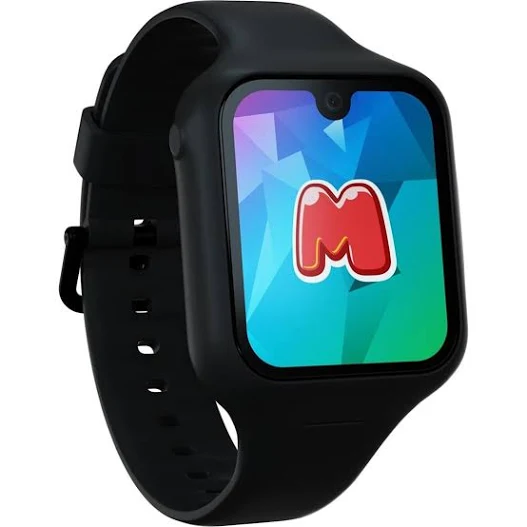
Moochies Odyssey
Garmin vs Apple vs the cheaper alternatives
Put plainly: Garmin wins on being designed for children, Apple wins on capability and lifespan, and the cheaper 4G watches win on entry price while costing roughly the same to run. Which of those matters depends entirely on your child’s age and your phone.
Why a kids Garmin watch usually wins for primary school
- The interface is built for a seven-year-old, not scaled down from an adult device
- Activity, chores and rewards give the watch a reason to exist beyond tracking
- Battery life is measured in days on the Bounce 2 and about a year on the vivofit jr. 3
- The parent app is the whole system, so you’re not stitching together settings
- It works with iPhone or Android, which the Apple route does not
Why Apple wins for the nine-plus crowd
- It’s a real smartwatch, so it doesn’t get outgrown at 11
- Family Setup gives you contact approval, Schooltime and Find My in one place
- Emergency SOS and fall detection are best-in-class
- Trade-off: iPhone households only, and the highest total cost by a clear margin
Where the cheaper 4G watches make sense
- When the only job is calls, messages, location and SOS, and $300-plus is not happening
- When you want an Australian brand with local support (Spacetalk) at a mid price
- Trade-off: the monthly plan is the same either way, so “cheap” mostly means cheap once
- Trade-off: software polish and update cadence are the first things to be cut
What to skip
- Anything advertising 2G or 3G connectivity: those networks are gone here. A watch that can’t do 4G in Australia is a toy with a clock.
- Unbranded marketplace watches with no brand name at all: no local support, no software updates, no clarity on where your child’s location data is stored.
- A tracker-only band for a child who needs to call you: it will not solve the problem you bought it for.
- House-brand basics (Anko and similar) as a safety device: fine as a first novelty watch for a five-year-old who wants something on their wrist, but don’t confuse them with a 4G watch-phone.
- Extra features you’ll immediately disable: if you know you don’t want a camera at school, don’t pay for one.
Kids smartwatches compared
| Product | Brand | Approx RRP | Key features | Best for |
|---|---|---|---|---|
| Bounce 2 #1 | Garmin | approx. $270 to $340 (plus monthly LTE subscription) | 4G calls and messages to approved contacts, live location and safe zones, chores and rewards, school mode, swim rating | Primary kids, roughly 5 to 12, iPhone or Android families |
| vivofit jr. 3 Budget | Garmin | approx. $120 to $170, no ongoing cost | Activity and sleep tracking, chores and rewards, character adventures, about a year on a coin cell, swim rating | Ages 4 to 8 where no calling or tracking is needed |
| Apple Watch SE (3rd generation) Premium | Apple | approx. $400 to $560 (plus a watch plan for cellular) | Family Setup, Schooltime, Find My location, Emergency SOS, fall detection, always-on display | Ages 9 and up in iPhone households |
| Adventurer 2 | Spacetalk | approx. $300 to $390 (plus a plan) | 4G calls and messages, SOS, safe zones and location history, camera, school mode, no browser | Families wanting an Australian brand with local support |
| Loop | Spacetalk | approx. $180 to $250 (plus a plan) | 4G calls and messages, location, SOS, school mode, slimmer case, simplified features | Younger primary kids who just need a direct line to you |
| Odyssey | Moochies | approx. $200 to $270 (plus a plan) | 4G calls and video calls, GPS, geofencing, SOS, parent app | Budget-conscious families who want video calling |
We’ve reviewed 6 smart sleep tech in total — compare the full list before you decide.
The running costs nobody quotes you
This is where kids smartwatch budgets quietly blow out. Any watch that can call, message or report its location needs a mobile connection, and that connection is a monthly bill for as long as the watch is in use. Over two years, the subscription or plan often costs more than the watch did.
How each route charges you
- Garmin Bounce 2: a Garmin LTE subscription that bundles the connectivity, priced at roughly $10 to $20 per month (approx.). One bill, no SIM shopping.
- Apple Watch SE with Family Setup: you need a cellular watch plan from a carrier that supports it in Australia. Typically the most expensive ongoing option, and worth confirming your carrier supports watch plans before you buy the watch.
- Spacetalk and Moochies: a SIM plan, either the brand’s own kid-watch plan or a compatible prepaid service. Small data allowances are fine, because these watches aren’t streaming anything.
- Garmin vivofit jr. 3: nothing. No SIM, no subscription, and a coin cell instead of a charger.
Do the two-year sum before you decide
Take the approximate purchase price, add 24 months of whichever plan applies, and compare the totals. A watch with a lower sticker price and the same monthly cost saves you less than it looks. It’s also the calculation that makes the vivofit jr. 3 so compelling for younger kids: if she doesn’t actually need to call you yet, the connected watch is an expense you can defer for a couple of years.
Safety, school rules and screen habits
Check the school policy first, not last
Every Australian state and territory now restricts mobile phone use in public schools, and many individual schools have extended that to smartwatches that can call, message or take photos. Policies vary: some allow a watch in school mode, some require it to be handed in, some ban cameras outright. A two-minute email to the front office before you buy can save you a $300 mistake, especially if you were leaning towards a watch with a camera.
What the standards actually cover
There isn’t a kids-smartwatch-specific Australian Standard the way there is for cots (AS/NZS 2172) or car seats (AS/NZS 1754), so don’t trust a listing that implies otherwise. What does apply:
- ACMA compliance and the RCM mark: any device transmitting radio signals and sold here must meet Australian electromagnetic and radio requirements. Reputable brands carry the marking; grey imports often don’t.
- Mandatory button battery standards: in force in Australia since 2022, covering secure battery compartments and warnings. Relevant to any watch with a replaceable coin cell, including the vivofit jr. 3.
- AS/NZS ISO 8124 (toy safety): this is the touchstone for products actually sold as toys, covering small parts, mechanical and physical hazards. Most of these watches are classed as consumer electronics rather than toys, so treat it as background rather than a tick you should demand.
- Privacy and data: a location-tracking device sends your child’s whereabouts somewhere. With a known brand you can read the policy and find a local support contact. With an unbranded watch, you often can’t.
Set the rules on day one
- Load only the contacts you want reachable, and check the list again after a few weeks
- Turn school mode on before the first school day, not after the first note home
- Decide where it charges (a shared spot, not the bedroom) so it becomes a habit
- Talk through what SOS is for, and practise it once so it isn’t pressed as a joke
- Agree that games and camera use are a privilege the watch can lose, without losing the phone function
mum. Approved: our top 3 for 2026
The most complete kids-first watch-phone: 4G calls to approved contacts, safe zones, real activity tracking and multi-day battery, on iPhone or Android.
About a year on a coin cell, no subscription and no screen-time worries, which makes it the least regrettable buy for four-to-eight-year-olds.
With Family Setup it’s the only pick a nine-year-old won’t outgrow by high school, provided you’re an iPhone household and budget for the plan.
Frequently asked questions
What age is right for a kids smartwatch?
It depends which type. A non-connected tracker like the Garmin vivofit jr. 3 suits about four and up and is really about habits and fun. A 4G watch-phone such as the Garmin Bounce 2, Spacetalk Loop or Spacetalk Adventurer 2 starts making sense when a child has real independence: walking home, sport drop-offs, after-school care, which for most families is somewhere between six and nine. An Apple Watch through Family Setup generally suits nine and up, both for wrist size and because you’re paying for capability a younger child won’t use.
Does a kids Garmin watch need a monthly subscription?
Only the connected ones. The Garmin Bounce 2 uses its own 4G connection for calls, messages and location, and that requires a Garmin LTE subscription (roughly $10 to $20 per month, approx.). The vivofit jr. 3 has no SIM and no subscription at all, so once you’ve bought it there’s no ongoing cost beyond a coin cell about once a year.
Can my child wear a smartwatch to school in Australia?
Often yes, but it depends on your school. All states and territories restrict phones in public schools and many extend that to watches that can call, message or take photos. Some schools accept a watch left in school mode all day; others require it to be handed in, or ban cameras specifically. Ask the office before you buy, particularly if you’re considering a model with a camera.
Can I use an Apple Watch for my child if I have an Android phone?
No. Family Setup requires a parent iPhone, so an Android household can’t use it. That’s the single biggest reason the Garmin Bounce 2 or a Spacetalk watch is the better route for many Australian families: both work across iPhone and Android, and both keep the contact list closed regardless of which phone you carry.
Are the cheap kids GPS watches on marketplaces worth it?
Usually not. The common problems are old 2G or 3G radios (those networks were switched off in Australia during 2024, so the watch can’t connect at all), no local support, no software updates, and no clarity about where your child’s location data goes. If budget is the constraint, a simpler watch from a known brand, such as the Spacetalk Loop or Moochies Odyssey, is a safer way to spend less than an unbranded watch with a longer feature list.
If we had to choose one, the Garmin Bounce 2 is our 2026 pick for primary-school kids: it does the calling, messaging, live location and safe-zone job you actually bought a watch for, it’s designed for a child rather than shrunk down from an adult device, and it doesn’t care whether you carry an iPhone or an Android. On a tighter budget the Garmin vivofit jr. 3 won’t let you down, provided you’re honest that it tracks activity rather than whereabouts, and if you’re an iPhone family with a nine-year-old who’ll still be wearing it in high school, the Apple Watch SE (3rd generation) with Family Setup is worth the extra outlay and the monthly plan.
Where to buy these picks
✓ Verified prices are checked live at the retailer. Otherwise we show the approximate RRP (an indicative recommended price, not a live retailer price), or “price pending” where we don’t have one.
Garmin Bounce 2
★ Best all-rounder
Garmin vivofit jr. 3
Best for younger kids
Spacetalk Loop
Best for small wrists
Moochies Odyssey
Best budget GPS watch
Spacetalk Adventurer 2
Best all-rounder GPS watch
Apple Watch SE (3rd generation)
Best for iPhone families
The shortlist, in your inbox
New winners, price drops and recalls worth knowing.