
Best Kids Tablet Australia 2026: iPad vs Amazon Fire vs Samsung Compared
If you’re reading this at 9pm with a toddler asleep and three browser tabs open comparing tablets, you already know the problem: every brand claims its parental controls are “the best,” and none of them make it easy to actually compare screen-time limits, drop resistance, or what happens when your kid inevitably licks the screen. You don’t need a tablet reviewer’s essay. You need to know which one survives a car trip, which one actually blocks YouTube ads, and which one you’ll still trust when your child is nine, not just four.
This guide compares the three real contenders Australian parents land on: Amazon’s Fire Kids range (built entirely around parental control), Samsung’s Galaxy Tab line running Samsung Kids, and Apple’s iPad with its built-in Screen Time tools. Each has a genuinely different philosophy on control versus flexibility, and the right one depends less on budget and more on how much you want to manage from your own phone.
What to look for in a kids tablet
Before you get pulled into spec sheets, narrow it down to the things that actually change day-to-day life with a tablet in the house.
- A genuine kids profile, not just an app: Samsung Kids and Amazon’s Kids+ are built into the operating system, while a stock iPad relies on Screen Time settings you configure yourself. Know which model you’re getting before you buy.
- Content curation versus content filtering: Amazon Kids+ pre-selects age-appropriate books, shows and apps for you. Apple and Samsung give you filtering tools, but you still choose what goes on the device.
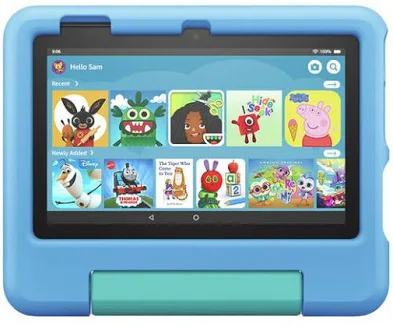
- Case and drop protection: the Fire Kids range ships with a chunky kid-proof case included in the price. iPads and Galaxy Tabs need a case bought separately, which adds to the real cost.
- Battery and storage for the age group: a five-year-old watching downloaded shows on a plane needs storage more than power. A ten-year-old doing school research or video calls needs a faster chip and more RAM.
- Longevity beyond the “kids” years: Fire Kids tablets are entry-level hardware designed to be outgrown. An iPad or Galaxy Tab can genuinely follow your child into high school if you strip the kids profile off later.
- Electrical safety compliance: look for the RCM (Regulatory Compliance Mark) sticker or listing, which confirms the tablet and its charger meet Australian electrical safety and electromagnetic compatibility requirements.
Our picks for 2026
1. Amazon Fire HD 10 Kids Pro
This is the tablet built specifically for the job, and it shows. The Fire HD 10 Kids Pro pairs a 10.1-inch screen with a genuinely tough rubberised case, and it comes bundled with a year of Amazon Kids+, which includes thousands of pre-filtered books, shows, games and educational apps sorted by age. It’s aimed at roughly ages six to twelve, sitting above the smaller Fire 7 Kids in both screen size and processing grunt.
The trade-off is that it runs Fire OS, not stock Android, so it can’t access the Google Play Store without some tinkering, and app selection outside the Kids+ ecosystem is genuinely limited. For a parent who wants total content control without manually configuring anything, that limitation is the entire point. Approx. RRP is around $200 to $250.
- Included kid-proof case and screen protector, no separate purchase needed
- Amazon Kids+ subscription bundled for a set period, then a small ongoing fee
- Parent Dashboard lets you set time limits, bedtimes and educational goals from your own phone
- Limited to Amazon’s app ecosystem, not the full Google Play Store
- Not the tablet you hand your child once they’re a teenager wanting normal apps

Amazon Fire HD 10 Kids Pro
2. Amazon Fire 7 Kids
The smaller, cheaper sibling in the same family, and honestly the better pick for the two to six age bracket where a smaller screen and lighter weight actually matter more than horsepower. It carries the same kid-proof case and Kids+ software as the HD 10, just on a 7-inch screen with less storage and a slower chip.
Where it genuinely struggles is loading time and multitasking. If your child is downloading a show while you’re trying to video call grandma on the same device, you’ll feel the lag. For a toddler who mostly wants the same three shows on repeat, that’s rarely a problem. Approx. RRP sits around $110 to $140.
- Small enough for little hands and a nappy bag, without feeling flimsy
- Same parental Kids+ ecosystem and Parent Dashboard as the HD 10
- Genuinely one of the cheapest tablets with a real kids mode built in
- Storage fills up fast with downloaded video content
- Slower processor makes it feel dated once a child is past about age six
Amazon Fire 7 Kids
3. Samsung Galaxy Tab A9+ (with Samsung Kids)
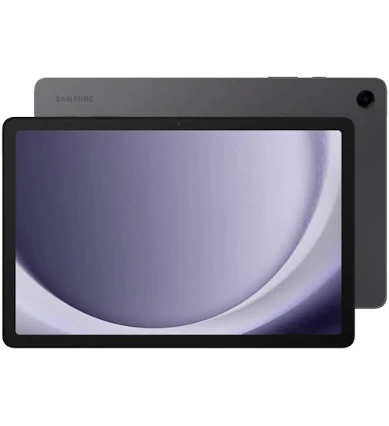
The Galaxy Tab A9+ is a standard Android tablet that happens to include Samsung Kids, a free built-in mode that turns the whole device into a curated, ad-free space with its own home screen, time limits and content filters, switchable back to a normal adult tablet in seconds. That flexibility is the real selling point over the Fire range: one device that genuinely grows with the family rather than getting shelved at age ten.
The compromise is that Samsung Kids isn’t quite as deeply curated as Amazon Kids+, it filters and limits rather than actively selecting age-appropriate content for you, so you’ll still be the one deciding which apps land on it. Approx. RRP is around $280 to $340 for the Wi-Fi model.
- Full access to the Google Play Store once the child outgrows Samsung Kids
- Samsung Kids mode is free, built in, and switches off instantly for adult use
- Bigger 11-inch screen and more storage than the Fire tablets
- No case included, budget separately for one
- Requires more manual setup of apps and filters than the Fire range
Samsung Galaxy Tab A9+
4. Apple iPad (11th generation)
For families already inside the Apple ecosystem, or those who want a device that will genuinely still be relevant in five years, the standard 11th-generation iPad is the premium pick. Screen Time, Apple’s built-in parental control suite, lets you set app limits, downtime windows, content restrictions and Family Sharing purchase approvals, all managed from a parent’s own iPhone.
It isn’t a dedicated kids tablet, and that’s exactly the trade-off: there’s no bundled case, no pre-loaded kids content library, and no default kids home screen, you build the restricted environment yourself inside Settings. For a parent willing to spend twenty minutes configuring it properly, it rewards you with genuinely excellent hardware longevity. Approx. RRP starts around $500 to $600 for the base storage.
- Screen Time and Family Sharing give granular, app-by-app control from a parent’s phone
- Hardware and software support last years longer than budget kids tablets
- Access to the full App Store, including genuinely excellent Australian curriculum-aligned learning apps
- No included case or kids content curation, both need to be sorted separately
- Highest upfront cost of the four, and an easy device for a child to use unsupervised if controls aren’t set properly
Apple iPad (11th generation)
How they compare
| Product | Brand | Approx RRP | Key features | Best for |
|---|---|---|---|---|
| Fire HD 10 Kids Pro #1 | Amazon | $200 to $250 | 10.1-inch screen, included kid-proof case, Amazon Kids+ bundled | Ages 6 to 12 wanting a set-and-forget kids ecosystem |
| Fire 7 Kids Budget | Amazon | $110 to $140 | 7-inch screen, included case, same Kids+ software as HD 10 | Toddlers and preschoolers, ages 2 to 6 |
| Galaxy Tab A9+ | Samsung | $280 to $340 | 11-inch screen, free Samsung Kids mode, full Google Play access | Families wanting one tablet that grows into a teen device |
| iPad (11th generation) Premium | Apple | $500 to $600 | Screen Time and Family Sharing controls, full App Store, long software support | Apple households wanting long-term value over kids-specific extras |
Not sure yet? Put all 9 educational toys we rate next to each other.
Parental controls compared: which system actually gives you control
This is the part most comparison articles skip, and it’s the part that matters most once the tablet is actually in your child’s hands.
Amazon Kids+ (Fire tablets)
- Content is pre-filtered by age before your child even sees it, so there’s less day-to-day decision-making for you
- Parent Dashboard app lets you set daily time limits, educational goals and bedtimes remotely
- Subscription-based after the included trial period, an ongoing cost worth factoring in
Samsung Kids (Galaxy Tab)
- Free, built into the tablet, no subscription required
- You choose which apps are visible inside Kids mode, giving more flexibility but more manual setup
- Switches instantly to a full adult Android tablet, useful for shared family devices
Screen Time (iPad)
- Managed from Family Sharing on a parent’s own iPhone, with app limits down to the minute
- Communication Limits control who a child can message or call, a feature the others don’t match
- Requires the most manual setup of the three, there’s no default “kids mode” out of the box
What to skip
A few patterns worth avoiding regardless of brand:
- Unbranded or generic “kids tablets” sold without a recognisable manufacturer, they rarely get security updates and often lack genuine parental control software, just a locked-down launcher.
- Any tablet advertised primarily on storage size rather than processor and RAM, a slow chip makes even simple apps frustrating for a child waiting on a loading screen.
- Buying the largest screen size “to future-proof it” for a toddler, a 7 to 8-inch screen is genuinely easier for small hands and less likely to be dropped.
- Skipping a case to save money, screen replacement or a full device write-off almost always costs more than the case would have.
mum. Approved: our top 3 for 2026
The only tablet here built entirely around not needing to manage content yourself.
Genuine parental controls and a tough case for toddler money.
Costs more upfront but is the only pick here your child could still be using in high school.
Frequently asked questions
What age is a kids tablet actually suitable for?
Most Fire Kids tablets are pitched from around age two, with content and complexity scaling up in the settings as your child grows. Samsung Kids and Apple’s Screen Time are flexible enough to suit primary school-aged children through to early high school, since you’re adjusting restrictions rather than using a fixed “kids” interface.
Do I need to buy a separate case for an iPad or Samsung Galaxy Tab?
Yes. Unlike the Amazon Fire Kids range, neither the iPad nor the Galaxy Tab A9+ ships with a protective case included, so factor that into your budget, particularly for younger children who are more likely to drop it.
Can I turn a regular iPad into a kids tablet without buying a dedicated kids model?
Yes. Apple doesn’t make a separate “kids” iPad, so Screen Time and Family Sharing, both built into every iPad, are how you create a restricted environment on a standard device. It takes more manual setup than Amazon’s Kids+ or Samsung Kids, but the underlying hardware is the same as any other iPad.
Is Wi-Fi only enough, or does my child need a tablet with mobile data?
For nearly all kids tablet use cases, home Wi-Fi, school Wi-Fi and downloaded content for the car cover it. A mobile data plan adds ongoing cost and reduces your control over what’s accessible outside the home, so it’s rarely worth it for a device aimed at children.
How long do kids tablets like the Fire HD range actually last?
Budget kids tablets like the Fire HD 10 Kids Pro and Fire 7 Kids are built as entry-level hardware, so most families find they suit a child well for two to four years before the processor and storage start to feel restrictive. An iPad or Galaxy Tab, being closer to standard consumer tablets, tends to have a longer useful life once the child outgrows a dedicated kids mode.
If you want a tablet that arrives ready to hand to a child with minimal setup and genuine parental oversight, the Amazon Fire HD 10 Kids Pro is our pick for 2026. On a tighter budget or for a younger child, the Amazon Fire 7 Kids covers the same ground in a smaller, cheaper package. If you’d rather invest once in a device that grows with your family well beyond the kids-tablet years, the Apple iPad (11th generation), set up properly with Screen Time, is worth the extra spend.
Where to buy these picks
✓ Verified prices are checked live at the retailer. Otherwise we show the approximate RRP (an indicative recommended price, not a live retailer price), or “price pending” where we don’t have one.
Amazon Fire HD 10 Kids Pro
★ Best for ages 6 to 12
Amazon Fire 7 Kids
Best for toddlers
Samsung Galaxy Tab A9+
Best all-rounder
Apple iPad (11th generation)
Best for Apple families
The shortlist, in your inbox
New winners, price drops and recalls worth knowing.