

eufy Baby Monitor Australia 2026: What $300 Buys vs VTech and Nanit
There is a particular kind of tired that arrives somewhere around the four month mark. The bassinet in your room has started to feel like a squeeze, everyone keeps telling you it’s time to move her into the nursery, and the thought of not being able to hear her breathing from an arm’s length away makes your chest go tight. That is usually the night the searching starts: phone at 2am, brightness down to one bar, typing “eufy baby monitor” with one thumb while a baby sleeps on your other arm.
The eufy name comes up constantly in those searches, and for a good reason. It sits in the awkward middle of the market: more capable than the cheap audio units, far cheaper than the app-based sleep trackers, and it is one of the few well known brands still selling monitors that do not touch your wifi at all. For a lot of Australian parents, that last point is the whole appeal. No account, no cloud, no news story about someone’s nursery camera turning up on a website.
So the honest question is whether around $300 on a eufy is money well spent, or whether you would be better off with a VTech at a third of the price, or stretching to a Nanit for the sleep data. This guide compares them on specs, real design trade-offs and what owners consistently report, so you can make one decision and go back to sleep.
Why eufy keeps showing up in Australian nurseries
eufy is the smart home arm of Anker, the company most people know for phone chargers and power banks. Its baby monitors split into two very different families, and understanding that split is most of the buying decision.
The non-wifi family
Models like the eufy Baby Monitor E110 use a dedicated 2.4GHz FHSS radio link between the camera and a hand-held parent screen. There is no app, no account, no router involved. The video signal hops frequencies between the two paired units and goes nowhere else. If your worry is a stranger watching your baby, this design removes the attack surface almost entirely, because there is no internet connection to attack.
The wifi family
Models like the eufy Baby Monitor S350 add app viewing, higher resolution and clever extras such as dual cameras and AI alerts, with recordings stored locally on the device rather than pushed to a paid cloud plan. You gain the ability to check in from work or from the in-laws’ place. You also take on the responsibility of a strong password, two factor authentication and keeping firmware current.
The bit eufy owners deserve to know
In late 2022 and early 2023, security researchers found that eufy security cameras (the home security range, not the non-wifi baby units) were uploading thumbnail images to cloud servers despite marketing that emphasised local storage. Anker acknowledged the issue, apologised publicly and changed its wording and its practices. It is a fair mark against the brand’s earlier claims, and it is also the reason many Australian parents choose a eufy model that has no internet connection at all: you cannot leak what you never upload.
- If privacy is your number one fear: a non-wifi model such as the E110 is the logically consistent answer, not a wifi camera with good intentions.
- If remote viewing genuinely matters: the S350 keeps footage local and does not force a subscription, which is rarer than it should be.
- Either way: check the unit is supplied with an Australian plug and carries the Regulatory Compliance Mark, and that you have local warranty support rather than a grey import.
What to look for before you spend anything
Most monitor regret comes from one of five things: the battery dies overnight, the screen is too dim to see anything useful, the connection drops at the far end of the house, the app nags for money, or the camera cannot be mounted anywhere safe. Use this as your checklist.
- Wifi or dedicated radio link: a dedicated FHSS or DECT link cannot be reached from the internet, which matters more to some families than any feature list. A wifi camera gives you remote viewing but needs a strong unique password and two factor authentication.
- Parent unit battery life: look for a monitor that survives a full night with the screen off and audio on. Many quote long hours in eco or audio-only mode and far fewer with the screen running constantly.
- Range through Australian walls: quoted ranges are line of sight. Double brick, a Hebel wall or a second storey will cut that dramatically, so a generous quoted range is a safety margin, not a promise.
- Night vision quality: this is the spec you will use every single night. Infrared that shows the rise and fall of a chest across a dark room is worth more than daytime resolution.
- Subscription or not: sleep tracking, video history and some alerts are often behind a paid plan. Budget for the ongoing cost, not just the box price.
- Mounting and cord safety: the camera must sit at least a metre away from the cot with the cord completely out of reach. If a model can only be mounted on the cot rail, walk away.
- Sound sensitivity and two way talk: being able to say “it’s okay, I’m coming” from the hallway settles some babies before you even open the door.
- Screen you can bear at 2am: an adjustable brightness and a true audio-only mode stop the parent unit lighting up your bedroom like a torch.
The wifi question, answered honestly
There is no single right answer here, only a trade-off you get to choose.
Choose non-wifi if
- The 2am fear you actually have is about privacy and hacking rather than data and charts.
- Your home wifi is patchy at the back of the house, or you are renting with a modem you cannot control.
- You want the monitor to work in a blackout or an outage, which a paired camera and parent unit will as long as both have charge.
- You want one device that does one job and never asks you to update an app.
Choose wifi if
- You will genuinely use remote viewing: a partner on night shift, a grandparent minding her, checking in from a work carpark.
- You want sleep pattern data, motion alerts or video clips to review later.
- You are comfortable setting a long unique password, turning on two factor authentication and installing firmware updates.
One thing worth saying plainly: no consumer baby monitor sold in Australia is a medical device, and none of them prevent SIDS. Red Nose safe sleep guidance (baby on the back, in her own safe sleep space, face uncovered, in the parents’ room for the first six to twelve months) is what actually reduces risk. A monitor is for your peace of mind and your convenience, and that is a perfectly good reason to buy one.
The best baby monitors for Australian families in 2026
Every pick below is a real, currently sold model. Prices are approximate RRP ranges only, because monitors are discounted heavily and unpredictably.
1. eufy Baby Monitor E110
This is the model most Australian parents mean when they say “the eufy one”. You get a 720p camera with strong infrared night vision, a 5 inch hand-held parent screen, two way talk, a room temperature reading, lullabies and a dedicated 2.4GHz FHSS link that never touches your router. Approximate RRP sits in the range of around $200 to $250, which is why the “is it worth $300” question comes up so often: it is usually not $300, and at its real price it is a genuinely strong buy.
What owners consistently praise is the battery and the night vision. Run it in the power saving or audio-only mode and it will comfortably see out a night, then wake the screen when she stirs. The infrared image is clear enough to see whether she has rolled or kicked off her sleeping bag without you opening the door and undoing twenty minutes of settling. What it will not do is compete on resolution with a wifi camera, and there is no app, so if you want to check on her from the office this is the wrong monitor for you.
It suits the exact moment this guide is written for: the move out of your room into her own at around four to six months, in a standard Australian house where the nursery is one or two rooms away. The camera relies on a wide angle lens and digital zoom rather than sweeping around the room, so mount it high on a wall with a clear view of the whole cot and cord well out of reach. If a motorised pan and tilt head is a must, look at the VTech below instead.
- Strength: no wifi, no account, no cloud, so the video simply cannot be intercepted from the internet.
- Strength: night vision and audio sensitivity that owners rate as the best part of the unit.
- Strength: long parent unit battery in eco mode, with a proper audio-only setting so your room stays dark.
- Trade-off: 720p, not HD, and no remote viewing at all when you are away from home.
- Trade-off: quoted range is line of sight, so double brick or a long block can shorten it noticeably.
eufy Baby Monitor E110
2. VTech BM2300
The unglamorous, deeply sensible option. The BM2300 is an audio-only monitor using a digital DECT link, with a talk-back function, sound level lights on the parent unit and a very long battery life because it is not driving a screen. Approximate RRP is around $60 to $90, which makes it a fraction of the price of everything else here.
Audio monitors get dismissed too quickly. For a newborn in a bassinet beside your bed, or for a nursery directly across the hall, you do not need video: you need to hear her clearly and to know the connection is solid. The sound level lights are surprisingly useful, because you can see her grizzle without the volume up. VTech is also one of the longest standing names in Australian baby monitors, which counts for something on warranty and support.
The honest limitation is the obvious one. When she is four to six months, rolling, and you are lying there wondering whether that rustle is a stuck arm or a dream, audio makes you get up and check. Video lets you look and stay in bed. Plenty of families buy the BM2300 first and add video later, and plenty are perfectly happy never adding it.
- Strength: secure DECT link with no internet connection and no app.
- Strength: excellent battery life and simple, forgiving operation at 3am.
- Strength: the lowest cost way to get a reliable, properly supported monitor.
- Trade-off: audio only, so every uncertain noise means getting up.
- Trade-off: no temperature reading or camera to check positioning after a roll.
VTech BM2300
3. Nanit Pro Smart Baby Monitor
Nanit takes a completely different approach. The camera mounts overhead, on a wall bracket or a floor stand, looking straight down at the cot, and computer vision turns that view into sleep data: how long she slept, how many times she woke, how long she took to resettle. Paired with Nanit’s Breathing Wear (a patterned band or sleep suit, with no sensor touching your baby’s skin), it also tracks breathing motion. Approximate RRP for the camera sits around $350 to $450, and the sleep insights sit behind a subscription, roughly $100 to $200 a year depending on the plan.
For a specific kind of exhausted parent, this is transformative. If you are working with a sleep consultant, tracking the effect of a routine change, or simply need evidence that last night was actually better than the night before, the data is the product. The overhead angle also gives the most complete view of a cot of anything on this list.
The trade-offs are real and you should weigh them properly. There is no dedicated parent unit, so your phone is the screen, which means the phone comes to bed. It is entirely wifi dependent, so a dropout at the far end of the house means a dropout in your monitor. Installation is a genuine job, and the mount needs to be secure with the cord fully out of reach. And the ongoing cost never stops. Nanit is not a medical device and does not diagnose or prevent anything, and it is important not to let breathing data become a new source of 2am anxiety.
- Strength: the best sleep tracking available to consumers, with a clear overhead view of the whole cot.
- Strength: breathing motion tracking through clothing, with nothing attached to your baby.
- Strength: multiple carers can view from their own phones, which helps a partner on nights.
- Trade-off: subscription for the features that justify the purchase, plus wifi dependency.
- Trade-off: no hand-held parent screen, so your phone becomes the monitor.
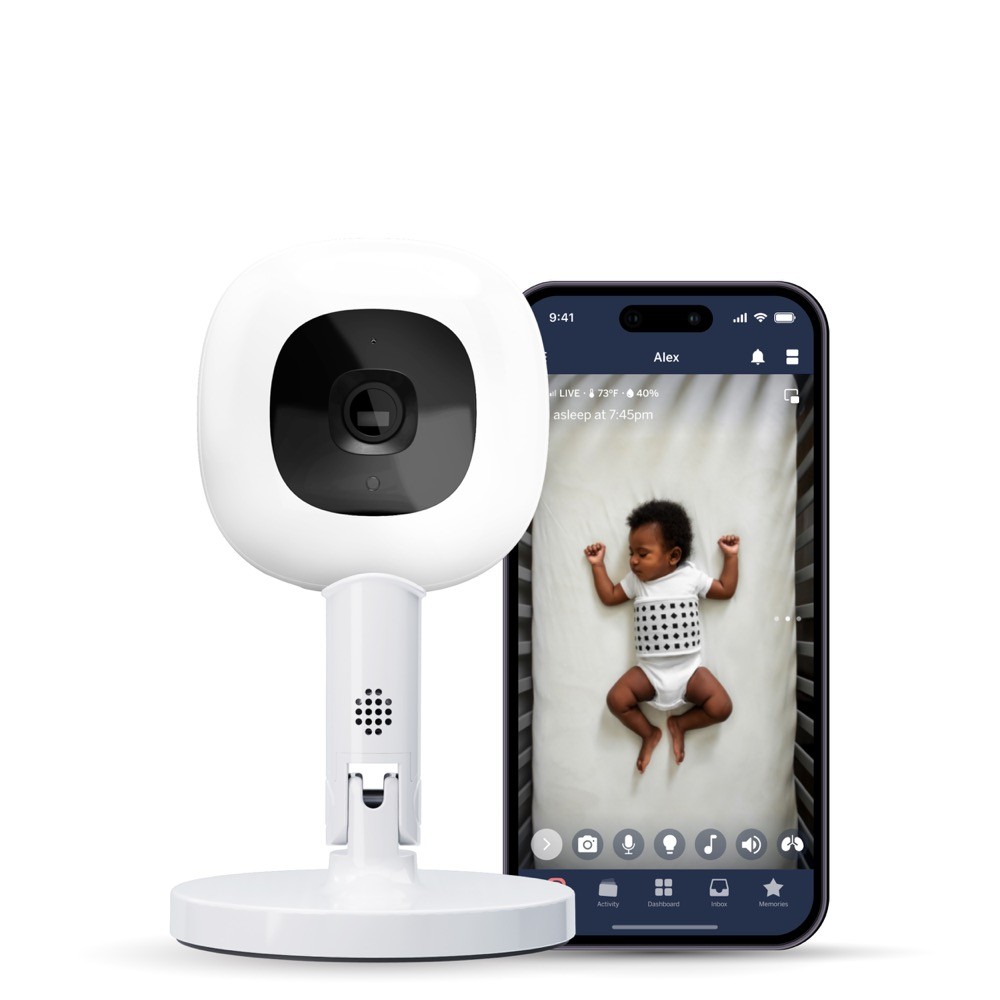
Nanit Pro Baby Monitor (Floor Stand)
4. eufy Baby Monitor S350
If the E110 is eufy playing it safe, the S350 is eufy showing off. It pairs a high resolution main camera with a second camera so you can watch a wide view of the cot and a close crop of her face at the same time, adds a 5 inch parent screen plus app access, and stores footage locally rather than pushing you to a paid cloud plan. Approximate RRP is around $400 to $500.
The dual camera idea sounds gimmicky until you have a baby who sleeps with her face pressed into the corner of the cot. Being able to keep a wide shot and a zoomed shot on the one screen answers the “where is she and can I see her breathing” question in one glance. The subscription-free local storage is the other genuine selling point, because it means the running cost is nothing.
The trade-off is that it is a wifi device, and that brings back everything the E110 avoids: an account, a password, firmware updates and trust in a brand that has previously been pulled up on its privacy claims. It is also the most expensive eufy by a distance, and for many families the extra spend over the E110 buys features they will use for a few months and then stop noticing.
- Strength: dual camera view and high resolution, which is unusual at any price.
- Strength: local storage with no forced subscription, so no ongoing cost.
- Strength: comes with a dedicated parent screen as well as app access, so your phone is optional.
- Trade-off: wifi connected, so you take on password hygiene and update responsibility.
- Trade-off: roughly double the E110 for benefits many parents will not use nightly.
eufy Baby Monitor S350
5. VTech BM5550
The closest direct rival to the eufy E110, and the pick if you want a motorised camera. The BM5550 offers a pan, tilt and zoom camera on a 5 inch colour parent screen over a secure non-wifi link, with two way talk, temperature display and lullabies. Approximate RRP is around $180 to $230.
Being able to steer the camera from the parent unit is more useful than it sounds once she is mobile in the cot, and later on when the same camera is watching a toddler bed and half a bedroom floor. VTech’s long presence in the Australian market also means the units are well understood and straightforward to get serviced under warranty.
Where it sits behind the eufy is in the details owners rave about: night vision clarity and parent unit battery endurance. The VTech is competent at both rather than outstanding, and the motorised head adds a small motor noise when it moves, which light sleepers notice. If you know you want to steer the camera, buy this. If you want the best possible dark room image and battery, the eufy E110 is the better pick.
- Strength: true motorised pan, tilt and zoom, controlled from the parent unit.
- Strength: secure non-wifi link with no app and no account required.
- Strength: strong local brand support and easy replacement parts.
- Trade-off: night vision and battery life are good rather than class leading.
- Trade-off: the motor makes a small audible whirr when repositioning.

VTech BM5550
eufy vs VTech vs Nanit at a glance
| Product | Brand | Approx RRP | Key features | Best for |
|---|---|---|---|---|
| Baby Monitor E110 #1 | eufy | approx. $200 to $250 | Non-wifi FHSS link, 5in parent screen, 720p, strong night vision, long eco battery | The bassinet to nursery move at 4 to 6 months, with no wifi worries |
| BM2300 Budget | VTech | approx. $60 to $90 | Audio only, DECT link, sound level lights, talk-back, long battery | Bassinet stage, a nursery across the hall, or a second unit |
| Pro Smart Baby Monitor Premium | Nanit | approx. $350 to $450 plus subscription | Overhead HD camera, sleep analytics, breathing motion via Breathing Wear, app only | Parents who want real sleep data and are working on settling |
| Baby Monitor S350 | eufy | approx. $400 to $500 | Dual camera, high resolution, parent screen plus app, local storage, no subscription | Remote viewing without an ongoing cloud fee |
| BM5550 | VTech | approx. $180 to $230 | Motorised pan, tilt and zoom, 5in screen, non-wifi, temperature display | Steering the camera around a cot or toddler room |
So, is around $300 worth it?
Put simply: the eufy E110 usually is, and often for less than $300. What you are buying over a $90 audio unit is the ability to look instead of getting up, night vision good enough to trust, and a battery that lasts the night. What you are not buying is HD video or remote access, and if either of those is a hard requirement, the money is better spent on the S350 or the Nanit. What almost nobody needs is to spend $300 on a wifi camera with a cloud subscription attached when a subscription-free option does the same job.
Not sure yet? Put all 20 baby monitors we rate next to each other.
Setting it up safely, and what to skip
Cord safety is the non-negotiable
Baby monitor cords are a genuine strangulation hazard and one of the most common ways a well intentioned setup goes wrong. Whatever you buy:
- Mount or place the camera at least one metre from the cot, and further if you can manage it.
- Run the cord so no part of it can be reached from inside the cot, including from a standing baby at the rail.
- Never cable tie a camera to the cot rail or hang it from the side, no matter how good the angle looks.
- Use proper cord clips or conduit up the wall rather than draping the lead across furniture.
- Re-check the setup the week she starts pulling to stand, because her reach changes overnight.
What the standards do and do not cover
There is no single Australian Standard that governs baby monitors the way AS/NZS 2172 governs cots or AS/NZS 1754 governs child car restraints. Monitors are electrical products, so what you should look for is compliance with the relevant Australian Standard for electrical safety and radio emissions, shown by the Regulatory Compliance Mark on the packaging or the plug, along with a proper Australian plug rather than an adaptor. The cot the camera is watching is a different matter: that should meet AS/NZS 2172, which sets out bar spacing, mattress fit and structural requirements for household cots.
What to skip
- Monitors with no dedicated parent unit that you know you will not use on your phone: if the phone comes to bed, so do work emails.
- Cloud-only video history plans if a local storage model does the same job for no ongoing fee.
- Cot rail mounts and clip-on brackets, for the cord reasons above.
- Very cheap unbranded wifi cameras with no named manufacturer, no firmware update history and no Australian support. This is exactly the category the nursery camera horror stories come from.
- Buying a second camera before you need one: most add-on cameras get bought for a sibling later, so wait and see if you actually want it.
What to check before you commit
- Does the parent unit have a true audio-only mode with the screen off?
- Can the camera be wall mounted, and does the box include the bracket?
- How long is the camera’s power lead, and will it reach a socket that is not next to the cot?
- Is there an Australian warranty and a local support contact, or is it an overseas import?
- For wifi models: does it support two factor authentication, and how often has firmware been updated?
mum. Approved: our top 3 for 2026
Excellent night vision and all-night battery on a link that never touches your wifi.
A rock solid secure audio link for a fraction of the price of anything with a screen.

The overhead view and sleep analytics are worth it if you will genuinely act on the data.
Frequently asked questions
Can a eufy baby monitor be hacked?
The non-wifi models such as the E110 are not connected to the internet at all. The camera and parent unit talk to each other over a paired, frequency-hopping 2.4GHz link, so there is no online account, no cloud server and nothing for a remote attacker to reach. The wifi models such as the S350 are internet connected, and like any connected camera they depend on you using a long unique password, turning on two factor authentication and installing firmware updates. It is also fair to know that eufy’s parent company was criticised in 2022 and 2023 over cloud handling in its home security camera range, acknowledged the problem and changed its practices, which is part of why the non-wifi baby models appeal to privacy-conscious parents.
Do eufy or Nanit charge a subscription?
eufy does not require one. The non-wifi models have no app at all, and the wifi models store footage locally on the device. Nanit’s camera works without a plan for basic live viewing, but the sleep analytics and breathing insights that are the main reason to buy it sit behind a paid subscription, so budget for an ongoing annual cost on top of the camera.
Will a baby monitor tell me if my baby stops breathing?
No. Nothing in this guide is a medical device, and no consumer monitor prevents SIDS or reliably alerts you to a breathing emergency. Products that track breathing motion, including Nanit’s Breathing Wear, are wellness features, not alarms you should depend on. What genuinely reduces risk is safe sleep practice as set out by Red Nose: baby on her back, in her own safe sleep space with a firm flat mattress, face uncovered, and sleeping in the parents’ room for the first six to twelve months. Buy a monitor for reassurance and convenience, not as a safety device.
What range do I actually need in a typical Australian house?
Quoted ranges are measured line of sight in open space, so treat them as headroom rather than a promise. Double brick walls, a fire door, a concrete slab between storeys or a long back extension all cut the real figure substantially. As a rough guide, a monitor quoting a few hundred metres line of sight will usually handle a standard single storey home comfortably, including out to a back deck. If you are in a two storey home or a rendered brick house with a nursery at the far end, favour a model with a generous quoted range and check the out-of-range alert works before you rely on it.
When should I buy a monitor, and how long will I use it?
Many families buy at the point the bassinet moves out of their room, commonly around four to six months, which is exactly when video becomes more useful than audio. Expect to keep using it well past the cot: a lot of parents keep the same camera running through the toddler bed years, which is where the ability to steer the camera on a model like the VTech BM5550 starts earning its keep. If you are buying before the birth, an inexpensive audio unit for the bassinet stage plus a video model later often works out better than buying one expensive monitor early.
For the specific moment most Australian parents are in when they start searching, moving a four to six month old into her own room and wanting to see her without waking her, the eufy Baby Monitor E110 is our 2026 pick: outstanding night vision, an all-night battery and a link that no one on the internet can reach. If the budget is tight or the nursery is across the hall, the VTech BM2300 does the essential job for a fraction of the money and won’t let you down. Only stretch to the Nanit Pro Smart Baby Monitor if you will genuinely use the sleep data and are happy with the subscription that comes with it.
Where to buy these picks
✓ Verified prices are checked live at the retailer. Otherwise we show the approximate RRP (an indicative recommended price, not a live retailer price), or “price pending” where we don’t have one.
eufy Baby Monitor E110
★ Best bassinet to cot move
All 4 prices we track for this pick
- Baby Zone $689.99 checked 21 Oct 2026
- Whole Bubs $749 checked 21 Oct 2026
- Baby Village $779 checked 21 Oct 2026
- Baby Bunting $799 checked 18 Oct 2026
VTech BM2300
Best entry level video
eufy Baby Monitor S350
Best no subscription fees
VTech BM5550
Best pan and tilt camera
The shortlist, in your inbox
New winners, price drops and recalls worth knowing.