
Best Kids Smart Watch Australia 2026: GPS Tracking Worth the Price? (Safety Compared)
If you’ve found yourself standing in the Big W tech aisle, staring at a wall of colourful kids smart watches and wondering whether they’re genuinely useful or just expensive wrist toys, you’re in very good company. Almost every Aussie mum I know has had this exact moment, usually triggered by their seven-year-old begging for one because “everyone at school has one, Mum!”
The truth is, the kids smart watch market has exploded in Australia over the past couple of years, and 2026 has brought a wave of seriously impressive options with proper GPS tracking, SOS buttons, and parent-controlled calling. But it’s also brought some duds, flashy watches with dodgy batteries, unreliable tracking, and apps that crash more than they connect.
We’ve compared the top kids watch options on the Australian market, looked at what Australian parents report about them, and dug into the safety standards that actually matter. This guide will walk you through whether GPS tracking is worth the price tag, which models genuinely deliver, and which ones to skip, all with honest AUD pricing and where to find them locally.
Why Australian Parents Are Buying Kids Smart Watches in 2026
Let’s be honest, the main reason most of us start considering a kids smart watch isn’t the step counter or the cute emoji games. It’s peace of mind. With more children walking to school independently, attending after-school activities, and playing in larger neighbourhood groups, parents want a way to stay connected without handing over a fully-featured smartphone.
According to recent Australian parenting surveys, around 1 in 3 primary school children now have access to some form of wearable tech, and that number has climbed steadily since 2024. The appeal is pretty straightforward:
- GPS location tracking, knowing where your child is in real-time
- Two-way calling with pre-approved contacts only
- SOS emergency button for genuine peace of mind
- No social media or internet access (unlike smartphones)
- Geofencing alerts if your child leaves a designated safe zone
The flip side? They’re not cheap, the monthly SIM costs add up, and not all watches work as advertised. That’s where this guide comes in.
What to Look for in a Kids Smart Watch (The Non-Negotiables)
Before we get into specific models, here’s what I’d consider essential for any kids smart watch worth your money in 2026:
1. Genuine 4G Connectivity (Not Just Bluetooth)
This is the big one. A watch that only pairs with your phone via Bluetooth is essentially useless once your child is more than 10 metres away. For real safety tracking, you need a watch with its own SIM card slot and 4G connectivity. Telstra, Optus and Vodafone all offer kids watch SIM plans starting around $10-15/month in 2026.
2. Accurate GPS + LBS + Wi-Fi Positioning
The best kids smart watches use three positioning systems combined, GPS for outdoors, LBS (cell tower triangulation) for backup, and Wi-Fi positioning for indoors like shopping centres or schools. Single-method GPS watches struggle once your child steps inside Westfield.
3. ACCC Compliance and Australian Safety Standards
Look for watches that meet Australian electrical safety standards (RCM mark) and have transparent privacy policies about where data is stored. Avoid grey-market imports from overseas sellers, they often lack proper compliance and warranty support.
4. Decent Battery Life
Anything under 24 hours is frustrating. Aim for watches advertising 2-3 days of typical use, knowing you’ll get slightly less in real life.
5. Water Resistance
Kids and water are inseparable. IP67 is the minimum, IP68 is better if your child is a keen swimmer.
The Best Kids Smart Watch Models in Australia 2026: Compared
Here’s a straight-up comparison of the top models available through major Australian retailers right now:
| Model | GPS | 4G Calling | Battery | Best For |
|---|---|---|---|---|
| Spacetalk Adventurer 2 | ✓ GPS+LBS+WiFi | ✓ | 2-3 days | Ages 5-12, best overall |
| Garmin Bounce | ✓ GPS+LBS | ✓ | 2 days | Active kids, sports |
| Apple Watch SE (Family Setup) | ✓ Full GPS | ✓ (cellular model) | 18 hours | Tweens 10+, iPhone families |
| Moochies Odyssey | ✓ GPS+LBS | ✓ | 2 days | Budget-friendly safety |
| Kmart Anko Kids Smart Watch | ✗ (no GPS) | ✗ | 3-4 days | Fun only, not safety |
| Fitbit Ace LTE | ✓ GPS | ✓ | 16-20 hours | Fitness-focused kids |
Want to see how these stack up? We’ve reviewed 21 health & safety in total.
Detailed Reviews: The Top Picks Compared
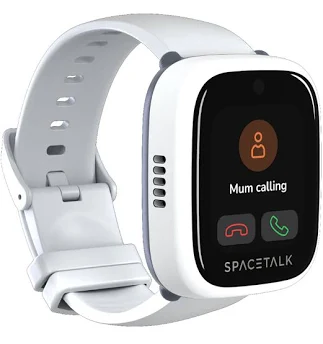
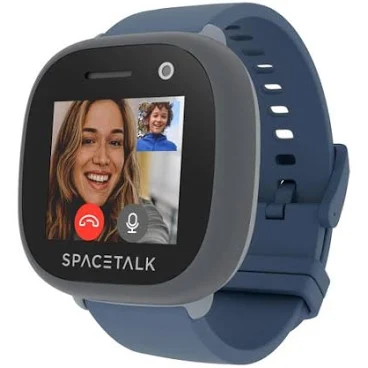
1. Spacetalk Adventurer 2, Best Overall
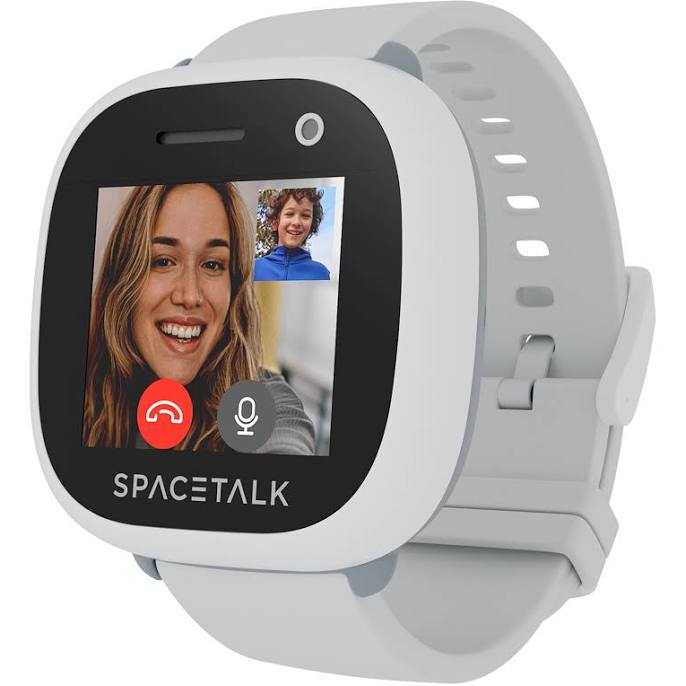
There’s a good reason the Spacetalk tops this list. Designed and supported by an Australian company (based in Adelaide), it’s built specifically with our market in mind, meaning local customer service, Aussie SIM compatibility, and a parent app that just works.
What stands out:
- Triple-positioning GPS is impressively accurate, even inside shopping centres
- School Mode disables games and calls during class hours
- SOS button calls up to three contacts in sequence
- No social media, no internet browser, closed ecosystem
- Australian-based support team you can actually phone
What to consider:
- Premium price point
- Requires a separate SIM plan (around $12.95/month with Spacetalk’s own plan)
- Slightly chunky on smaller wrists
2. Garmin Bounce, Best for Active Kids
If your child is the type who’s never sitting still, always at footy, swimming, or zooming around on a scooter, the Garmin Bounce earns its spot. Garmin’s heritage in fitness tracking shines through, with proper activity monitoring alongside the safety features.
Pros: Excellent build quality, strong GPS accuracy, gamified fitness challenges kids genuinely enjoy, comfortable enough for sleep tracking.
Cons: Parent app (Garmin Jr) is less polished than Spacetalk’s, calling quality is okay but not stellar.
3. Apple Watch SE with Family Setup, Best for Tweens
For families already in the Apple ecosystem with older kids (10+), the Apple Watch SE configured through Family Setup is hard to beat. You’ll need the cellular model (not GPS-only) and an iPhone to set it up, plus a SIM plan from Telstra or Optus.
Why it works for tweens: Full Apple Maps, Apple Pay for school canteen (with parental controls), Schooltime mode, and proper messaging through approved contacts. It feels grown-up, which matters when your 11-year-old refuses to wear anything “babyish.”
The catch: 18-hour battery means daily charging, and the total cost (watch + cellular plan) creeps up fast.
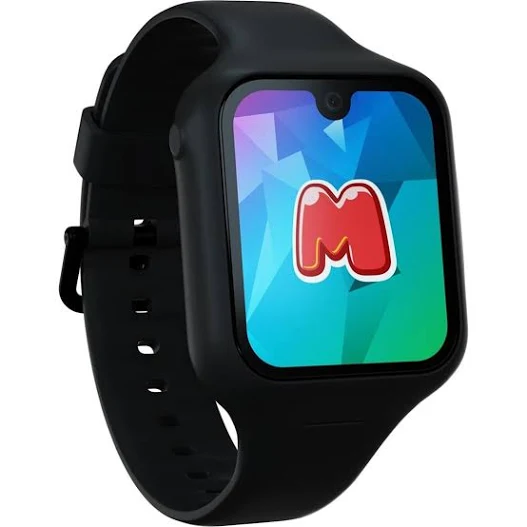
4. Moochies Odyssey, Best Budget Safety Option
Moochies has quietly become a favourite for parents wanting the safety basics without the Spacetalk price tag. It covers the essentials, GPS tracking, video calling, SOS button, geofencing, at a noticeably lower price.
Trade-offs: GPS isn’t quite as snappy as the Spacetalk, and the screen feels a touch less premium. But for kids aged 5-9 who just need basic safety contact, it does the job beautifully.
5. Kmart Anko Kids Smart Watch, The Honest Truth
I include this not as a recommendation but as a heads-up. The $39 Kmart kids watch is fun, it has games, a camera, step counting, and the kids love it. But it has no GPS, no SIM, no calling, no SOS. It’s a toy, not a safety device. Perfectly fine as a birthday present or fun watch for younger kids, but don’t mistake it for the real deal.
Is GPS Tracking Actually Worth the Price?
Here’s the honest answer: it depends entirely on your situation.
GPS tracking is genuinely worth it if:
- Your child walks or rides to school independently
- They attend after-school activities you don’t drive them to
- You have a child who tends to wander (sensory needs, ASD, or just an adventurous spirit)
- You live somewhere busy, major cities, tourist areas, or near public transport
- Your child does sleepovers, camps, or grandparent visits without you
You might not need it if:
- Your child is always with you or another supervising adult
- You’re in a small, close-knit community where kids roam freely (and safely)
- Your child is under 5, most aren’t ready for the responsibility
- You’re primarily wanting it for “cool factor”, a $39 Kmart watch will scratch that itch for a fraction of the cost
The most common feedback from parents is that the SOS button and the ability to call them directly (without giving the child a phone) is worth the price alone. The GPS tracking is the cherry on top.
The Hidden Costs: SIM Plans and Ongoing Fees
One thing nobody tells you up front: that $349 watch is just the beginning. Here’s what you’ll actually pay over a year in 2026:
| Provider | Notes |
|---|---|
| Spacetalk SIM Plan | Includes calls, texts, data |
| Telstra Kids Watch Plan | Best regional coverage |
| Optus Family Plan Add-on | Discounted if on existing plan |
| Catch Connect (Optus network) | Budget option, urban only |
So realistically, a Spacetalk Adventurer 2 with a SIM plan costs around $349 upfront + $155 per year. Over three years (a reasonable lifespan), that’s roughly $814 total, or about $22 per month. Is that worth knowing where your child is at any moment? That is a call only you can make for your family.
mum.com.au Approved: Our Top Picks for 2026
After comparing the models, the plans and what Australian parents report about them, here are our official recommendations for 2026:
Best Overall: Spacetalk Adventurer 2 ($349)
For most Australian families with primary-school-aged kids, this is the watch we’d recommend without hesitation. The combination of accurate tracking, Australian customer support, and a closed ecosystem (no internet, no social media) makes it the most parent-friendly option on the market.
Best Value: Moochies Odyssey ($249)
If the Spacetalk price tag feels steep, the Moochies delivers 90% of the safety features for $100 less. Excellent for first-time kids smart watch buyers.
Best for Sporty Kids: Garmin Bounce ($279)
If your child lives in their sports uniform, the Garmin’s activity tracking adds genuine value alongside the safety features.
Best for Tweens: Apple Watch SE Family Setup ($429)
For kids aged 10+ who’d roll their eyes at a “kids” watch, the Apple Watch with Family Setup is the grown-up choice that still gives you parental control.
⚠ Skip This One: Generic Imports Under $100
There are multiple imported brands sold through online marketplaces with serious security flaws, unreliable GPS, and zero local support. The few dollars saved aren’t worth the headaches.
Setting Up a Kids Smart Watch: Practical Tips
Once you’ve made your choice and unboxed the watch, here are the practical setup tips that’ll save you frustration:
- Set up the SIM before gifting it. Activating a SIM can take a few hours. Don’t do this on Christmas morning or your child’s birthday.
- Add school hours to the “School Mode” or “Do Not Disturb” settings. Most teachers are fine with the watches as long as they don’t ring or buzz during class.
- Practice the SOS button together. Make sure your child knows when (and when not) to press it, a false alarm at 6am is a rite of passage.
- Set up geofencing for home, school, and grandparents’ houses. You’ll get an alert when they arrive and leave each location.
- Have a clear conversation about expectations. The watch is for safety and connection, not for endlessly messaging friends or playing games during dinner.
Our top pick across the board for most Australian families.
The value choice when you want the essentials without overspending.
The splurge pick if you want the most features and finish.
Frequently Asked Questions
Are kids smart watches allowed at Australian schools?
Most Australian primary schools allow kids smart watches as long as they’re in silent or school mode during class hours. Some schools have specific policies, always check with your child’s school first. High schools are more variable, with some banning them along with phones. The Spacetalk and Moochies both have built-in school modes designed specifically to comply with school policies.
What age is appropriate for a kids smart watch?
The sweet spot is generally ages 5-12. Below age 5, most children aren’t ready to use it responsibly or look after it. Above age 12, many kids will start asking for a proper smartphone instead. Year 1 to Year 6 is the prime window where a kids watch provides genuine value.
Can someone hack into my child’s smart watch?
This is a valid concern. Stick to reputable brands with strong encryption and Australian data storage (Spacetalk, Garmin, Apple, Moochies all qualify). Avoid cheap imports, there have been documented cases of unsecured Chinese-imported watches being accessed by strangers. Always change default passwords and enable two-factor authentication on the parent app.
Will a kids smart watch work in regional or rural Australia?
Coverage depends on your network. Telstra has the strongest regional coverage in 2026, so if you’re in regional WA, NT, or rural Queensland, a Telstra SIM is worth the slight extra cost. In remote areas with no mobile coverage at all, even the best watch won’t work, it relies on cell networks for tracking and calls.
What happens if my child loses or breaks the watch?
Most reputable brands offer 12-month Australian warranties through retailers like JB Hi-Fi and Harvey Norman. For accidental damage, consider extended warranty cover or product insurance, it adds around $40-60 to the purchase price but covers cracked screens, water damage beyond the IP rating, and loss in some cases. Worth it for younger kids who are still learning to look after expensive things.
The Bottom Line: Our Final Recommendation
If you’ve made it this far, you’re clearly serious about making the right choice, and honestly, that thoughtfulness is half the battle. A kids smart watch isn’t just a piece of tech; it’s a tool for navigating that tricky stage when your child is gaining independence but still needs a safety net.
For most Australian families in 2026, our recommendation is the Spacetalk Adventurer 2 at $349. It’s the watch that gets the balance right, proper safety features, an Australian company behind it, a closed ecosystem that keeps kids away from the wilder corners of the internet, and reliable performance whether you’re in inner-city Melbourne or out on the Sunshine Coast.
If budget is tight, the Moochies Odyssey at $249 is a genuinely good alternative. And if your child is older or already in the Apple ecosystem, the Apple Watch SE with Family Setup is excellent, just be prepared for daily charging.
Whatever you choose, remember that no piece of tech replaces the everyday conversations you have with your child about safety, boundaries, and asking for help when they need it. The watch is a tool, you’re still the parent doing the brilliant work of raising them. Trust your instincts, and you’ll choose the right one for your family.
Where to buy these picks
✓ Verified prices are checked live at the retailer. Otherwise we show the approximate RRP (an indicative recommended price, not a live retailer price), or “price pending” where we don’t have one.
Spacetalk Adventurer 2
★ Best all-rounder GPS watch
Kmart Anko Kids Smart Watch
Best for fun, not safety
Garmin Bounce
Best for active kids
Spacetalk Loop2
Best for younger kids
Moochies Odyssey
Best budget GPS watch
Spacetalk Adventure 2
Best for independent commuting
Show all 9 picksShow fewer
Fitbit Ace LTE
Best for fitness tracking
Apple Watch SE
Best for Apple families
Apple Watch SE (Family Setup)
Best for tweens
The shortlist, in your inbox
New winners, price drops and recalls worth knowing.